Black and White Geometric Digital Paper: Clean, Versatile Patterns for Designers and Crafters
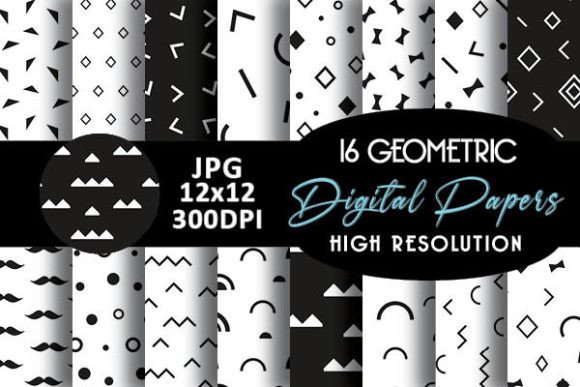
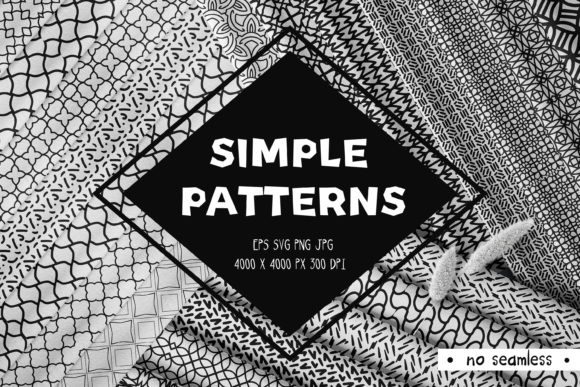
Black and white geometric digital paper offers a timeless, high-contrast aesthetic rooted in precision, balance, and visual clarity. Unlike traditional printed scrapbook paper or textured backgrounds, this collection delivers 30 distinct, non-seamless patterns—each crafted digitally for maximum flexibility and professional-grade output. Designed with intention rather than repetition, these patterns avoid infinite tiling, making them ideal for projects where uniqueness, focal emphasis, or intentional composition matters most.
Why Designers and Makers Choose Black and White Geometric Digital Paper
Many creative professionals face recurring challenges: finding backgrounds that feel modern but not trendy, sourcing assets that scale flawlessly across print and screen, and avoiding visual fatigue from overused textures or low-resolution downloads. Black and white geometric digital paper answers those needs by combining minimalist sophistication with technical reliability. Its monochrome palette ensures effortless compatibility with any color scheme, typography choice, or branding system—no color correction needed. And because geometry relies on structure—not randomness—it conveys professionalism, order, and thoughtful design without competing for attention.
What You’ll Receive—and Why Format Matters
When you download this collection, you get one well-organized ZIP file containing all 30 patterns in three widely supported, production-ready formats:
- EPS (v10): Fully editable vector files—perfect for resizing without quality loss, adjusting stroke weights, or recoloring individual elements in Adobe Illustrator or compatible software.
- PNG (4000 × 4000 px, 300 dpi): Crisp, transparent-background raster files ideal for layering in Photoshop, Canva, or Procreate—great for mockups, social media graphics, or digital presentations.
- JPG (4000 × 4000 px, 300 dpi): High-resolution, print-optimized files ready for immediate use in layout programs like InDesign or Affinity Publisher—ideal for brochures, stationery, packaging, or art prints.
Each pattern is intentionally non-seamless. That’s not a limitation—it’s a design decision. Seamless tiles can sometimes create unintended visual rhythms or distract from content. These patterns give you control: place them as full-page backdrops, crop sections for custom frames, overlay with text or photography, or use them as deliberate borders and dividers. Their finite boundaries invite thoughtful placement—not automatic repetition.
Real-World Applications You Can Implement Today
Whether you're a graphic designer, educator, small-business owner, or hobbyist, Black and white geometric digital paper adapts to your workflow:
- Branding & Identity Projects: Use a bold angular motif as a subtle background in a business card or letterhead—adding depth without overwhelming your logo or contact details.
- Educational Materials: Teachers and course creators apply these patterns to worksheets, slide decks, or printable planners—enhancing visual hierarchy while maintaining readability and focus.
- Digital Product Design: Integrate clean line-based patterns into UI mockups, app onboarding screens, or dashboard headers to reinforce structure and guide the user’s eye.
- Print-on-Demand & Crafts: Scale patterns for greeting cards, fabric transfers, or vinyl decals—especially effective when paired with foil stamping or embossing for tactile contrast.
- Art & Mixed Media: Print select patterns on fine-art paper, then collage, paint over, or layer with tracing paper for contemporary mixed-media pieces.
Who Benefits Most—and How They Use It Differently
A freelance graphic designer might open the EPS files to isolate and recombine shapes into a custom icon set. A wedding stationer may drop a single JPG pattern into a layered Photoshop document to create elegant save-the-date postcards—then adjust opacity and blend modes to soften impact. An educator could import PNGs into Google Slides, using them as consistent section dividers across a 10-week curriculum deck. Meanwhile, a DIY crafter might print one pattern at home, cut it into strips, and use it as washi tape-inspired embellishments for journals or gift wrap.
The versatility lies not just in the files—but in how each user interprets “geometric.” Some see symmetry and repetition; others see rhythm, tension, or negative space. Because these patterns aren’t forced into seamless loops, they support that range of interpretation. You’re not locked into tiling—you’re invited to compose.
Practical Tips Before You Begin
To get the most from your Black and white geometric digital paper collection, keep these considerations in mind:
- Start simple: Try one pattern at a time. Layer it subtly behind body text at 5–10% opacity before committing to full-coverage use.
- Check contrast: While black-and-white ensures broad compatibility, verify legibility when placing light text over dense patterns—consider adding a semi-transparent shape behind your type for consistency.
- Respect scale: A tightly packed grid may overwhelm small-format items like stickers or icons. Zoom out and test how the pattern reads at actual size—not just on your monitor.
- Leverage metadata: Name your layers clearly (e.g., “Pattern_07_EPS” or “Pattern_12_JPG_Background”) to streamline future edits and client handoffs.
Stay Updated and Connected
If you find value in this collection, consider subscribing to stay informed about new releases—including upcoming expansions like grayscale tonal variations, expanded geometric categories (e.g., organic geometry, asymmetric layouts), or companion templates designed specifically for these patterns. Subscribers receive early access, exclusive discounts, and direct insight into upcoming tools shaped by real user feedback.
Have questions? Need guidance on adapting a specific pattern for your project? Don’t hesitate to leave a message—I’m here to help. Your experience matters, and your input directly influences future designs.
♥ Thank you for visiting me ♥
♥ Leave your feedback and suggestions ♥