Primary Prints Digital Paper
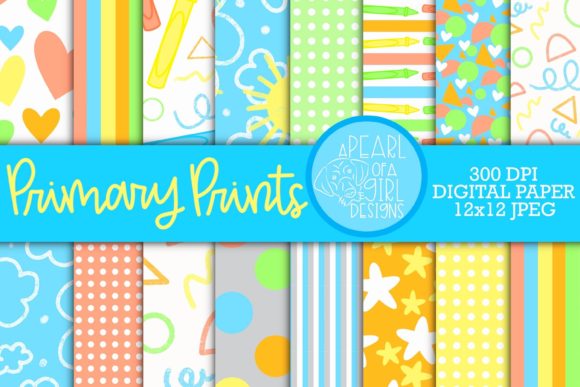
Primary Prints Digital Paper is a thoughtfully crafted set of 12×12 digital papers designed for real-world creative work—not just decoration, but function. It’s built around soft, approachable primary colors (think buttery yellows, sky blues, and muted reds—not neon or overwhelming saturation) and seamless patterns that include clouds, suns, crayons, geometric shapes, dots, stripes, and subtle hand-drawn motifs. Each paper is optimized for versatility: high-resolution (300 DPI), JPG format, and ready to drop into design workflows without resizing or quality loss.
Why Seamless Patterns Matter in Practice
Seamless patterns aren’t just a technical detail—they’re what make Primary Prints Digital Paper genuinely usable across formats. Whether you’re tiling a blog background, repeating a pattern across wrapping paper, or building a planner cover that wraps cleanly from left to right, the absence of visible seams means professional results without extra editing. Unlike single-illustration assets, these papers behave like physical designer paper: predictable, scalable, and consistent. That reliability saves time—especially when working under deadline or across multiple projects.
Creative Uses That Go Beyond “Scrapbooking”
While scrapbooking and digital scrapbooking are natural fits—especially for memory-keeping, baby showers, or milestone celebrations—the set shines in less obvious contexts:
- Educators use the crayon and shape patterns for printable classroom posters, behavior charts, and student reward certificates—soft colors reduce visual fatigue while keeping engagement high.
- Small business owners apply cloud or sun motifs as subtle backgrounds in email headers, social media banners, or product packaging mockups—adding warmth without competing with messaging.
- Bloggers and content creators layer the papers behind text blocks or use them as section dividers to create rhythm and visual hierarchy—no need for complex CSS or custom illustrations.
- Freelance designers incorporate the patterns into client brand kits as secondary textures—e.g., using the dot paper as a low-opacity overlay on a presentation slide to soften contrast while reinforcing a playful, accessible tone.
- DIY crafters print the papers on adhesive vinyl for custom stickers, or scale them for fabric printing (quilting cotton, napkins, nursery curtains)—the 300 DPI resolution holds up well even at larger physical sizes.
Designing With Intention—Not Just Aesthetics
Using Primary Prints Digital Paper effectively isn’t about applying pattern everywhere—it’s about matching intent to application. For example:
- A planner insert benefits most from the simplest patterns (subtle dots or faint grids) so handwritten notes remain legible and uncluttered.
- A digital wallpaper for tablets or desktops works best with lower-contrast motifs like clouds or soft stripes—patterns that recede rather than dominate screen space.
- A party invitation can combine two papers: one as a full background, another cropped and used as a decorative border or corner accent—creating depth without overcomplicating layout.
This kind of intentionality keeps designs clear and audience-friendly. When color and pattern serve structure—not just style—they support comprehension, not distract from it.
Adapting for Different Platforms and Outputs
The same file performs differently depending on where it lands. Here’s how to adapt Primary Prints Digital Paper smartly:
- Websites & blogs: Use JPGs as CSS background images with
background-repeat: repeat;. Avoid stretching—let the seamless tile do the work. For accessibility, ensure text contrast remains WCAG-compliant (test with browser tools or plugins). - Digital planners & Notion templates: Import papers as page backgrounds in PDF editors or design tools like Canva or Affinity Designer. Keep layers non-destructive—duplicate before cropping or masking so originals stay intact for reuse.
- Print-on-demand products: When uploading to platforms like Printful or Redbubble, verify bleed and safe-zone requirements first. The 12×12 size gives flexibility—but always check final trim dimensions to avoid cutting off key pattern elements.
- Social media graphics: Scale down only as needed. Instagram posts (1080×1080) or Pinterest pins (1000×1500) can use centered crops of the full paper—no resampling required thanks to the high DPI.
Staying Organized Across Projects
With 16 coordinated papers, consistency is easy—if you plan ahead. Name files meaningfully (e.g., primaryprints_clouds_lightblue.jpg, primaryprints_crayons_mutedred.jpg) instead of generic “paper_01.jpg”. Store them in a dedicated folder labeled with date and version (e.g., PrimaryPrints_v1_2024). If you’re collaborating or sharing assets, include a simple text file listing pattern names and suggested uses—this prevents misalignment and speeds up team onboarding.
Realistic Inspiration—No Overpromising Required
You don’t need a full rebrand or a 20-page project to benefit from Primary Prints Digital Paper. Try this: pick one paper—say, the sun motif—and use it across three small, real tasks this week:
- Create a printable weekly habit tracker (print or digital).
- Design a simple thank-you card for a client or friend (use Canva or Illustrator).
- Update your desktop wallpaper to match your current focus—calm (clouds), energy (crayons), or clarity (geometric shapes).
That’s not “crafting.” It’s practical design thinking applied incrementally. And because the colors and patterns coordinate, switching between those uses feels cohesive—not chaotic.
Final Thought: Tools Support People, Not the Other Way Around
Primary Prints Digital Paper succeeds because it respects how people actually work: with constraints, deadlines, shifting priorities, and varied skill levels. It doesn’t ask you to master new software or learn illustration techniques. It meets you where you are—with a ZIP file, JPGs, and 16 reliable starting points. Whether you’re sketching a lesson plan, prepping a product launch, or making something joyful for your child’s nursery, the value isn’t in the prettiest paper—it’s in the time saved, the confidence gained, and the quiet satisfaction of choosing something that just *works*.