Easter Digital Papers
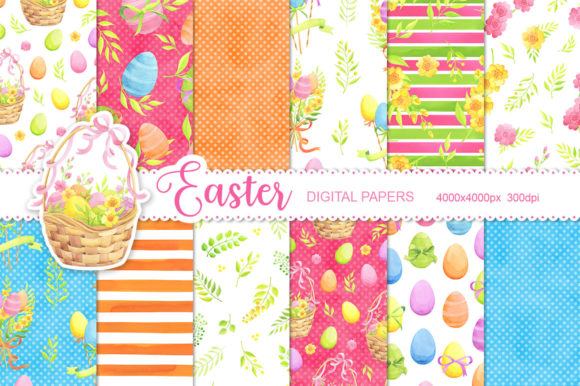
If you're designing an Easter-themed invitation for your child’s classroom party, wrapping handmade soaps for a spring market stall, or building a cohesive social media campaign for your boutique—Easter Digital Papers gives you a fast, flexible, and professional starting point. These aren’t generic clipart bundles or low-res stock textures. This set is built around 12 watercolor seamless patterns: hand-painted, scanned at high fidelity, and carefully edited to tile perfectly—so whether you’re filling a full A4 print or zooming into a fabric swatch detail, the texture stays smooth and authentic.
What You’re Actually Getting (and Why It Matters)
Each of the 12 digital papers comes as a JPEG file at 4000×4000 pixels, 300 DPI. That resolution isn’t just for show—it means you can confidently use these patterns on physical products like gift tags, custom wrapping paper, or even small-batch fabric prints without pixelation or blur. Seamless tiling also saves hours: no more manually aligning edges or patching gaps when scaling across banners, web backgrounds, or packaging mockups.
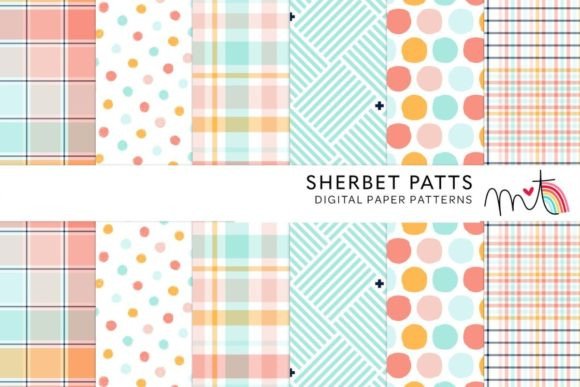
The watercolor aesthetic adds warmth and tactility—ideal when you want to avoid the sterile feel of vector-only designs. Think soft eggshell blues, dusty pinks, sage greens, and warm creams—all with subtle granulation, pigment bleed, and gentle washes that mimic real watercolor paper. That authenticity helps your designs feel intentional, not algorithmically generated.
Real Uses—Not Just “Ideas”
You don’t need a design degree—or even Photoshop—to get value from Easter Digital Papers. Here’s how people actually use them:
- Small business owners print these patterns onto kraft paper to wrap seasonal candles or bath bombs—then photograph them for Instagram posts. One candle maker told us she used a muted lavender-and-eggshell pattern for her Easter collection; customers commented that the packaging “felt handmade, even though it was consistent.”
- Teachers and homeschoolers drop the patterns into Canva or Google Slides to create themed worksheets, classroom door decorations, or printable Easter bingo cards. Because the files are high-res JPEGs, they scale cleanly—even when projected onto a whiteboard.
- Bloggers and content creators layer them behind text in newsletter headers or use them as subtle background textures in Pinterest pins. Unlike busy photos or gradients, these watercolor papers add visual interest without competing with copy.
- Fabric designers and crafters import them directly into Spoonflower or Printful workflows. Since each pattern repeats flawlessly, there’s no guesswork about repeat size or alignment—just upload, adjust scale, and order test swatches.
- Freelance designers use them as base layers for client projects—adding foil accents in Illustrator, overlaying hand-lettered quotes, or masking in product mockups. One designer shared that she reused one soft yellow-and-white pattern across three different clients’ Easter campaigns (a bakery, a florist, and a children’s book launch)—each time adjusting contrast or hue slightly to match brand guidelines.
When It Fits—and When You Might Pause
Easter Digital Papers works best when you need speed *and* substance—when “good enough” isn’t enough, but hiring a custom illustrator isn’t practical or budget-friendly. It shines in situations where consistency matters: launching a limited-edition product line, preparing for a holiday pop-up, or building a branded email sequence over several weeks.
That said, it’s worth pausing before downloading if:
- You need editable vectors (these are raster JPEGs—great for printing and web, but not for resizing infinitely without loss).
- Your project requires licensing for mass-produced physical goods beyond standard small-batch use (always check the included license terms—most personal/commercial licenses cover up to 500 physical units per design, but verify before large-scale manufacturing).
- You’re aiming for bold, graphic, or highly stylized Easter motifs (bunnies, eggs with faces, glittery typography). These papers are texture-first—not illustration-based—so they complement rather than replace character-driven assets.
How It Changes Your Workflow—Practically
Before using Easter Digital Papers, many users described their Easter prep as fragmented: hunting for free textures, adjusting opacity to mute clashing colors, stitching together mismatched scans, then re-exporting multiple times to test print quality. After? One educator said she cut her design prep time by two-thirds—spending less time troubleshooting and more time personalizing student handouts with names and inside jokes.
Another benefit isn’t visible on screen—but in confidence. Knowing your background texture won’t pixelate on a printed poster or look “off” next to real paper stock removes one layer of uncertainty. That’s especially valuable if you’re new to design tools or managing a team without dedicated creative support.
Pairing It With What You Already Have
You don’t need special software. These JPEGs open in any image editor—from free options like Photopea or Canva to pro tools like Affinity Photo or Adobe Photoshop. In Canva, just upload, set as background, and adjust transparency if needed. In Illustrator, place the file and use Object > Pattern > Make to convert it into a scalable swatch (though native seamless behavior means this step is often optional).
They also play well with other assets. Try pairing a soft mint-and-cream watercolor paper with clean sans-serif type for modern Easter cards—or layer a pale yellow pattern under a scanned sketch of daffodils for a botanical postcard. The subtlety of the watercolor grain gives depth without overwhelming.
A Note on Seasonal Flexibility
While designed for Easter, these patterns extend naturally into broader spring themes. That same dusty rose-and-linen pattern works just as well for Mother’s Day branding, baby showers, or early summer farmers’ market signage. Users report reusing them across March, April, and May—adjusting color balance or cropping focus areas to shift emphasis. One stationer even used a single eggshell-blue pattern across three seasonal collections (Easter → Earth Day → Graduation), changing only the typography and accent color.
In short, Easter Digital Papers isn’t just about checking a holiday box. It’s about having a reliable, beautiful, and versatile texture library ready when inspiration strikes—or when the deadline looms. Whether you’re printing 10 gift tags or 10,000 email headers, it helps you show up consistently, thoughtfully, and on time.